myt support
myt business
myt travel
myt travel is a comprehensive service designed to provide business customers with exclusive access to a dedicated online portal for efficiently managing and placing bulk orders of myt travel plans for all their employees and staff. The service ensures seamless, reliable, and affordable data connectivity in over 190 countries, all without incurring standard roaming charges, allowing users to maintain continuity, such as keeping their existing WhatsApp number to stay connected with their team.
The administrative advantage is the streamlined, centralised billing process: all travel plan purchases are charged directly to the company’s existing fixed-line number, eliminating the administrative hassle and need for immediate, upfront payment using credit cards, debit cards, Maucas, or myt Money for each order.
- Visit our website: https://business.myt.mu for registration.
- Enter your company and authorised person details, upload the company BRN and any Mauritius Telecom bills for the last 3 months.
- Then follow the registration instructions and complete the registration.
Once your registration is validated by Mauritius Telecom, you will receive a notification containing the super admin credentials and access instructions.
You will then be able to register for myt travel.
The super admin credential allows the administrator to manage the company's profile and associated accounts. Furthermore, the super admin can add one or more client admin per service and designate the specific fixed-line number to be used for billing. Depending on the privileges and role assigned, the designated client admin will have the ability to add the users’ email address and the selected myt travel plan to the user who will be on travel.
- After login, the client admin adds selected travel bundle to the cart.
- Next, assign the staff email address as required.
- The client admin then selects the fixed line number for billing purposes.
- Once the above steps are completed, the client admin must review and confirm the order.
- The team member or staff who will be travelling will then receive the QR code and user should follow the eSIM installation instructions received by email.
We recommend purchasing your myt travel plan prior to your departure to ensure everything is ready before your flight
You need an eSIM compatible device to use myt travel.
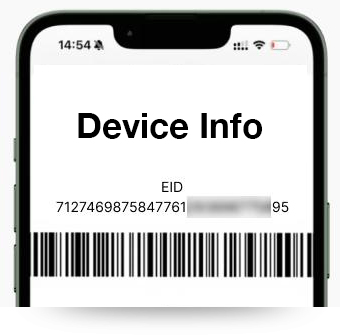
Dial *#06# to confirm your smartphone’s eligibility. Your device is compatible if “EID” appears under Device Info.
Upon receiving the email containing the QR code, the user simply needs to scan this code to install and activate the myt travel plan directly on his mobile device.
Ensure that your Wi-Fi/mobile data is ON during the activation process.
Android
- Go to Settings, select Connections, Select SIM Manager, select Add eSIM.
- Scan the QR code received by email.
- Go to Connections and select Mobile Network
- Turn ON Data Roaming for your new myt travel eSIM
IOS
- Go to Settings, Cellular/Mobile data, select Add eSIM.
- Select Use QR code
- Scan the QR code received by email.
- Go to Mobile Service and select on Mobile Data options
- Turn ON Data Roaming for your new myt travel eSIM
If you are experiencing issues to install, ensure the following:
- Disconnect Wi-Fi and wait for a few minutes to allow the eSIM to set itself up correctly after scanning the QR code.
Additional Information
- If your eSIM is not connecting to a network, please ensure that Cellular/Mobile Data is assigned to your eSIM and Data Roaming is turned ON.
- If you are connected to a network but data connection is not working as expected, please check if APN is mentioned in your eSIM profile information. If yes, please set the correct APN for your eSIM. Please turn Airplane mode ON for a few seconds, then turn it OFF, and check the connection again.
Unlimited bundle provides 1GB of high-speed data every 24 hours. After you finish the 1GB, your speed is reduced to 512 kbps for the rest of the 24-hour period.
Yes, you can still use data, but at a reduced speed of 512kbps until the next reset.
Your 1GB high-speed allowance resets every 24 hours from the time your bundle is activated. Example: If you activate the bundle at 10:00 AM, it resets the next day at 10:00 AM.
With myt travel, there are no roaming charges, no bill shock.
Yes, you can. Your existing WhatsApp number, chats and contacts will remain unchanged, and you can continue using WhatsApp normally throughout your trip.
Scan the QR code received by email and complete the process for installation before your departure.
- Switch ON data roaming of your myt travel
- Connect to the local mobile operator
- The validity of your plan will then start
myt travel is an eSIM with mobile data plan supporting data ONLY. Traditional calls and SMS are not available. However, you can stay connected via WhatsApp calls and texts. (This includes other apps which use mobile data for calling).
Yes, myt travel offers affordable mobile data plans for both myt and non-myt customers traveling abroad.
Yes. It is recommended to switch off data roaming on your primary number (existing mobile number) to avoid bill shock. Switch on data roaming on your secondary number (eSIM) to enjoy the benefits of myt travel.
- Sign in to your account
- Click on the Profile icon
- Go to My eSIMs
- Select Add Top Up
- Sign in to your account
- Select My eSIMs
- Tap on Plan details to view your consumption
The validity period for a plan begins upon connection to the destination country. For example, if a user purchases a bundle for Turkey (valid for 30 days) but downloads the eSIM in Mauritius, the plan will be activated once the user arrives in Turkey, and the validity period will then start.
The validity of each plan varies but the validity period takes effect on the date of the top up.
For example, when you purchase a 1GB plan with a validity period of 7 days and top up an additional plan of 3GB with a validity period of 30 days, your plan will be 4GB (1GB + 3GB) and the validity period will be extended by 30 days.
Each myt travel eSIM profile is typically associated with one device. If you need to use the eSIM on multiple devices, you'll need to purchase separate profiles for each device.
No. The Profile is valid for one device only.
No, 1 QR code can be scanned/ used by 1 device only.
Yes, you can. Please refer to the email sent for the activation of your myt travel. Download and follow the activation instructions accordingly.
Please contact us on our WhatsApp number 55005001 or send an email to myttravel@telecom.mu immediately to deactivate the profile and prevent unauthorised usage.
No. Unfortunately, a refund is not possible once myt travel is purchased.
Yes, myt travel allows you to use mobile data in multiple countries during your trip, provided your purchased plan includes coverage in those countries. We recommend choosing a regional plan to ensure it covers all the destinations you intend to visit.
Cellplus has partnerships with various network providers worldwide who offer coverage in multiple countries and regions. The specific network providers may vary depending on your location and destination. On your preferred plan, click on Supported countries then click on the [i] next to the country you plan to visit to get the network providers available.
Please ensure that your device’s eSIM settings are properly configured, your data roaming is switched on your myt travel and that you’re within coverage range. You can also reach out to us on our WhatsApp number 55005001 for further assistance or follow the troubleshooting tips:
- Check Network Coverage: Ensure that you are within the coverage area of the network provider associated with your myt travel as coverage may vary depending on your location and destination. If you’re experiencing poor reception, try moving to a different location or area with better network coverage.
- Restart Your Device: Sometimes, a simple restart of your device can resolve connectivity issues. Turn off your device, wait a few seconds, and then turn it back on to see if the issue persists.
- Verify eSIM Settings: Double-check the eSIM settings on your device to ensure that the myt travel profile is properly installed and activated. Go to your device’s settings menu, then look for the “Cellular” or “Mobile Data” section to manage your eSIM settings. Make sure the myt travel profile is selected as the Cellular data plan.
- Reset Network Settings: Try resetting your device’s network settings. This will reset Wi-Fi, Bluetooth, and cellular settings to their default configurations.
Note that resetting network settings will remove saved Wi-Fi networks and Bluetooth devices, so you may need to re-enter passwords and re-pair devices.
- Check for Account Balance and Validity: Ensure that your myt travel account has sufficient balance and that your data plan is still valid. If your account balance is low or your plan has expired, you may experience connectivity issues until you top up or renew your plan.
If you're connected to a network but experiencing issues with your data connection, please verify if the APN (Access Point Name) is provided in the selected bundle on business. myt.mu. Select your specific bundle and click on ‘>’ to view the APN information. If an APN is listed, set it correctly for your eSIM. Then, turn Airplane mode ON for a few seconds, turn it OFF, and check your connection again.
For Android: Go to Settings > Mobile Networks > Access Point Names, tap Add or +, and enter the APN code/info under APN.
For iOS: Go to Settings > Cellular > Cellular Data Network and enter the APN code/info under APN.