
Why eBill?
Better for you. Better for Mauritius.
Make your monthly billing easier while helping reduce paper use.
Delivered to you
Receive your bill directly by email, with an SMS notification when it is ready.
Easy to keep track
Store, search and organise your bills digitally whenever you need them.
Less paper waste
Choose a practical billing option that supports a greener Mauritius.
Get started
Choose how you want to register.
The quickest option is through the myt care app. Other registration channels are also available.
Register on myt care
Choose email, SMS or both in the app.
- 1
Open the myt care app
Select your Internet & TV service.
- 2
Tap “Register to eBill”
Choose Bill by email or Bill by SMS, then tap Add.
- 3
Verify your details
Enter the OTP sent to your email address or mobile number.
Register via Selfcare
Manage your bill dispatch preferences online.
- 1
Log in to Selfcare
Open Payments, then Billing details.
- 2
Select your number
Choose Bill dispatch and select “By email”.
- 3
Save your email address
Enter one or more email addresses and save your changes.
Register online
Use the dedicated eBill registration service.
- 1
Keep your account details ready
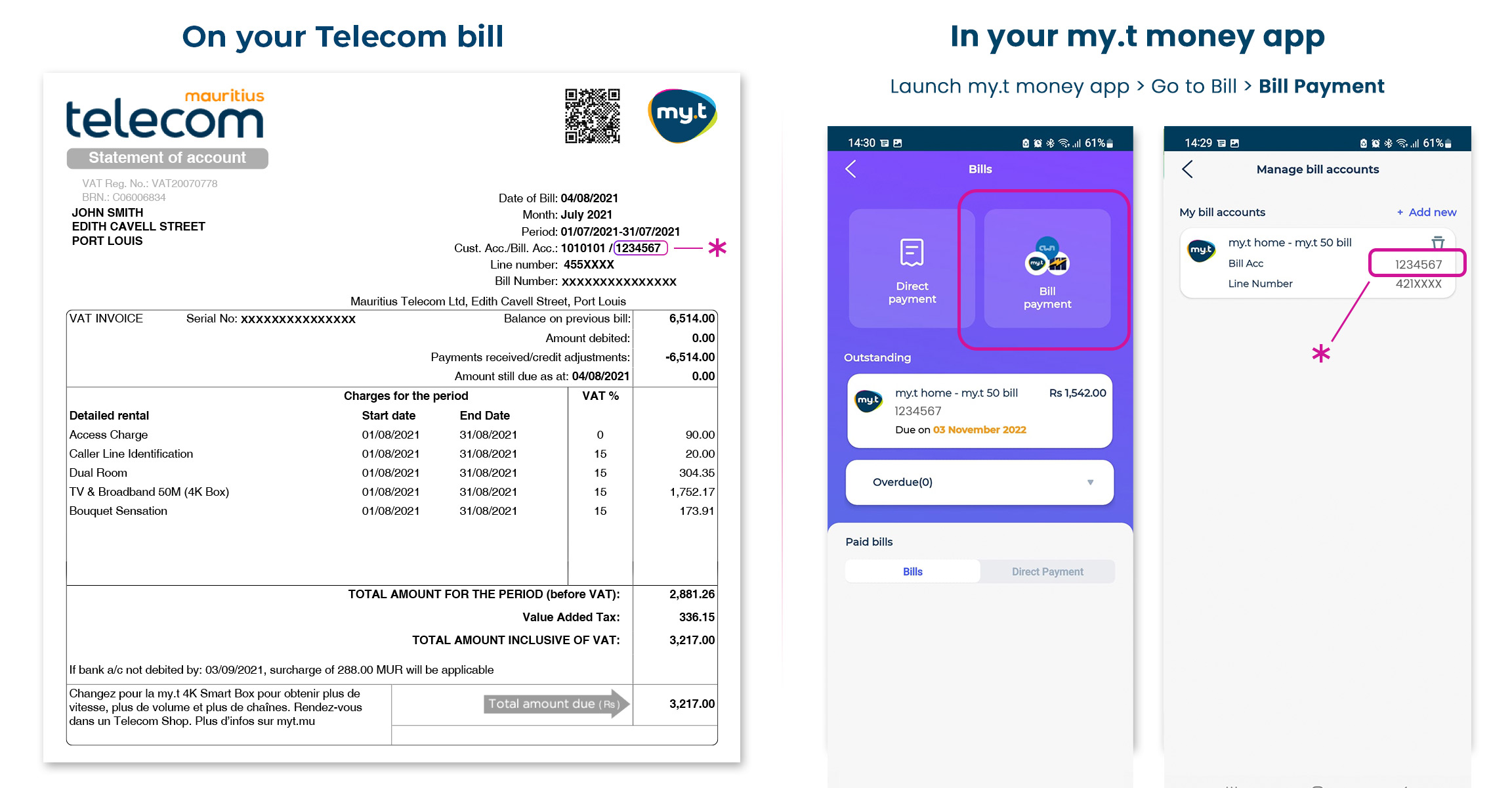
You will need your fixed line and Bill Account numbers.
- 2
Enter your contact details
Choose your email address and/or mobile number.
- 3
Confirm your registration
Follow the verification instructions shown.
Visit a myt Shop
Our team can help you register in person.
- 1
Bring your billing details
Have your fixed line and Bill Account numbers ready.
- 2
Provide your contact details
Share the email address and/or mobile number to register.
- 3
Complete your registration
A team member will guide you through the process.


Frequently Asked Questions
An eBill (electronic bill) is the digital version of your traditional paper bill. Instead of receiving it by post, you get it electronically via email, SMS, online portals, or mobile apps. It’s faster, more convenient, and environmentally friendly.
Register for the eBill service for FREE and start receiving your MT bills digitally — by email, SMS, or both.
You can register to eBill:
On myt care app
- Open myt care app
- Go to Internet & TV and tap on “Register to eBill”
For Bill by email
- Under section “Bill by email”, tap on “Add”
- Enter your email address to receive your OTP
- Enter the OTP received by mail on the app
- Your email will be registered
For Bill by SMS
- Under section “Bill by SMS”, tap on “Add”
- Enter your 'Mobile Number' to receive your OTP
- Enter the OTP received by SMS on the mobile number.
- Your Mobile Number will be registered.
On myt mu
Click here to register
On Selfcare
- Log in to Selfcare
- Click on Payments
- Click on Billing details
- Select number
- Click on Bill dispatch
- Select By email
- Enter email address(es)
- Click on Save Changes and Register now
In a Telecom Shop
eBill is a convenient and environmentally friendly alternative to traditional paper bills. You can access your eBills anytime, anywhere. And receive automatic notifications once a new bill is issued.
By switching to eBills, you help reduce paper waste, which can contribute to sustainability efforts and environmental conservation.
eBills are stored digitally, making it easier to track and organise your billing history.
You will need:
- Your Fixed line number
- Your Bill Account number
- Your mobile phone
- Your mobile number and/or email address
Yes, eBill is a free service.